
Analog Camera Has No Video? Check the Signal at Both Ends of the Coax
Recent Posts
-
-
-

-
-


Popular Posts
-

-

-

-

-


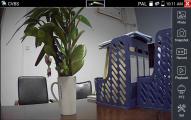
A BNC plug can fit perfectly while the recorder reports “video loss.” The connector does not tell you what signal the camera is sending. Take a short, working coax lead and a tester that accepts the camera’s documented output to the camera end of the run.
1. Check power and the video input
Read the camera label for its supply type and voltage. For a DC input, check polarity and available current too. Identify how this installation powers the camera, especially if the recorder supplies power over coax. Follow the equipment instructions before connecting a test input to a powered line.
Trace the video lead from the camera’s main output to the tester’s video input. A spot-monitor or service output can use a different format from the main output. Lock the BNC connectors and inspect the centre pins before changing camera settings.
2. Match the format and resolution
Read the camera’s current output mode from its documented switch position or menu. Select the matching AHD, TVI, CVI or CVBS mode on the tester. Check the supported resolution and frame rate for that particular input. A recorder that accepts 1080p TVI may still reject a higher-resolution TVI signal.
If the tester displays a format or resolution, record it. If a multi-format camera needs a temporary change, write down its original setting first and choose a mode supported by both the camera and the intended recorder.
3. Put the installed cable back into the test
- Picture on the short lead. Keep the camera, supply and tester mode fixed. Reconnect the installed path and test at the recorder end. If the image disappears, check the two terminations, intermediate couplers and any balun pair.
- No picture on the short lead. Feed a known working camera of the same output format and resolution into the same tester input. A good picture here directs attention back to the original camera, its supply and its selected output.
Finish by viewing the intended DVR channel and playing back a fresh recording.